August 08, 2026 • 15 min read

August 08, 2026 • 15 min read
Ever scrolled through social media and wondered, "How much is my competitor spending on ads?" or "What messaging are they testing right now?" You're not alone. Every marketer has tried to peek behind the curtain of their competitors' advertising strategies.
Here's the good news: You don't need to guess anymore. Ad libraries have transformed competitive research from speculation into science.
An ad library is a searchable database of advertisements running across digital platforms. Think of it as a public archive where you can view active and historical ads from any brand, analyze their creative strategies, and understand what's working in your industry — all without spending a dollar on your own campaigns first.
In this guide you'll find what ad libraries are, how they work, why they exist, and how marketers use them to gain a competitive edge. Whether you're launching your first campaign or managing seven-figure budgets, understanding ad libraries is essential for modern digital marketing.
Quick Summary: Ad libraries are transparent databases that display current and past advertisements from brands across social platforms. Originally created for political ad transparency, they now help marketers research competitors, discover creative trends, validate strategies, and reduce ad testing costs.
An ad library is a publicly accessible repository of advertisements that brands and businesses are running (or have run) on digital platforms. These databases contain the ad creative, copy, targeting details, runtime dates, and sometimes performance metrics.
The concept is simple: Instead of ads disappearing into the digital void after their campaigns end, they're archived in a searchable format. Anyone can look up a brand name and see every ad they're currently running or have run in the past.
Key characteristics of ad libraries:
• Searchable by brand: Type in any company name and see their ad history
• Multi-format coverage: Includes image ads, video ads, carousel ads, and stories
• Transparent information: Shows when ads started running and on which platforms
• No login required: Most native platform libraries are completely free and public
• Historical data: Access to past campaigns, not just current ones
For example, if you wanted to see how Sephora promotes its seasonal sales, you could search their name in an ad library and view every variation they're testing — different images, headlines, and calls-to-action.
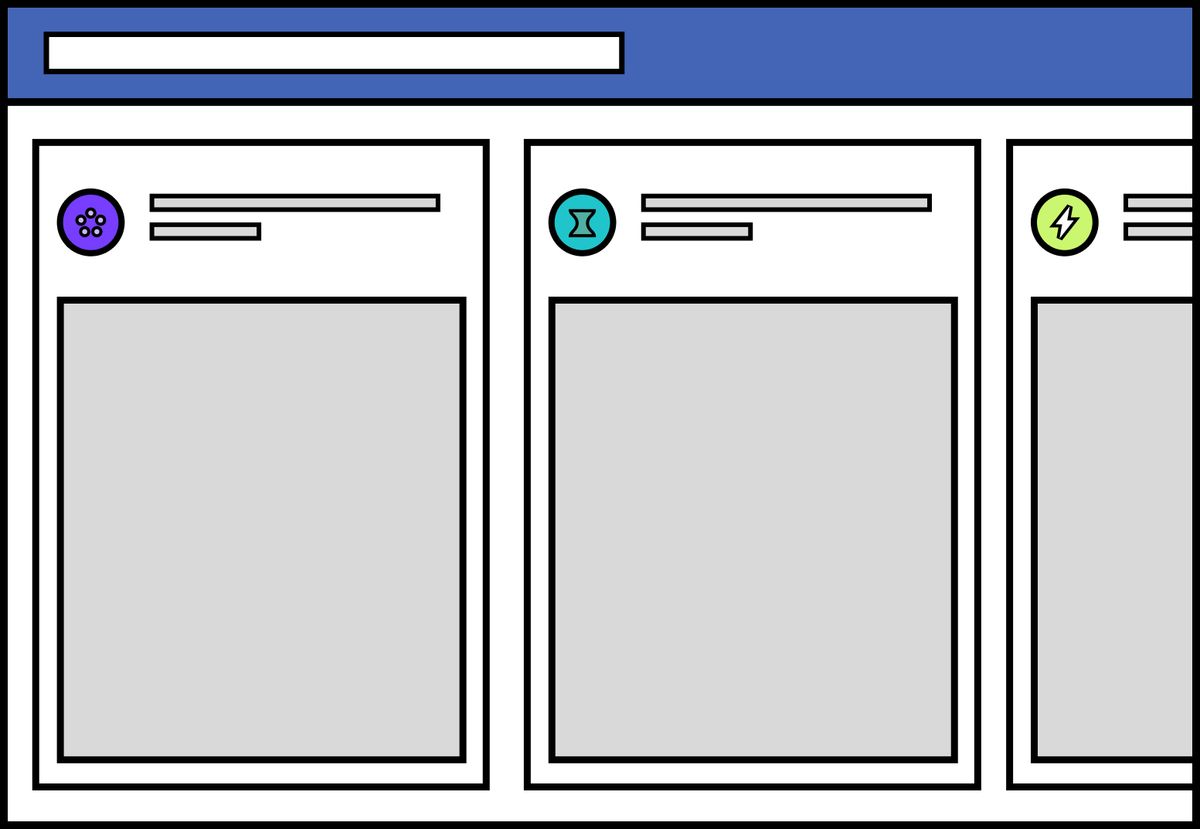
Layout of Meta Ad Library
Ad libraries weren't created for marketers. They were born from political pressure and regulatory requirements.
In 2018, following controversies around political advertising and misinformation on social platforms, Facebook (now Meta) launched its Ad Library to increase transparency. The idea was simple: If political ads can influence elections, the public deserves to see who's paying for them and what messages they're spreading.
The regulatory drivers:
• Political advertising scrutiny: After the 2016 US elections, governments demanded visibility into political ad spending
• Consumer protection laws: Regulations like GDPR in Europe pushed for advertising transparency
• Platform accountability: Social networks needed to demonstrate responsible advertising practices
• Public trust: Platforms wanted to rebuild credibility by opening their ad ecosystems
Other platforms quickly followed suit. TikTok, Google, LinkedIn, and others launched their own ad libraries, each with varying levels of detail and accessibility.
While ad libraries were designed for transparency, marketers immediately recognized their value for competitive intelligence. What started as a regulatory requirement became one of the most powerful free research tools available.
Today, ad libraries serve dual purposes: They satisfy regulatory requirements while providing marketers with unprecedented visibility into competitor strategies.
Ad libraries function through a combination of automated tracking systems and platform databases. Here's what happens behind the scenes:
When an advertiser launches a campaign on a social platform, the system automatically logs specific information:
Ad submission: Advertiser creates and submits ad creative with targeting parameters
Approval process: Platform reviews ad for policy compliance
Library entry: Once approved, ad details are added to the public library
Real-time updates: Active status, start dates, and sometimes spend ranges are updated continuously
Historical archiving: Even after campaigns end, ads remain searchable for months or years
The depth of information varies by platform, but most ad libraries include:
Basic information:
• Ad creative (images, videos, text)
• Headlines and body copy
• Call-to-action buttons
• Landing page URLs
• Brand/advertiser name
Campaign details:
• Date the ad started running
• Platforms where it appears (Facebook, Instagram, Messenger, etc.)
• Active or inactive status
• In some cases, estimated impression ranges
Political/social issue ads get additional scrutiny:
• Detailed funding information
• Precise spending amounts
• Geographic targeting details
• Demographic reach data
Most ad libraries offer several ways to find relevant ads:
• Brand search: Look up specific companies by name
• Keyword search: Find ads containing specific terms or phrases
• Category filters: Sort by industry, ad format, or campaign objective
• Date ranges: View ads from specific time periods
• Geographic filters: See ads targeted to particular countries or regions
The user experience is straightforward: Enter a search term, browse results, and click through to view full ad details. No special access or technical knowledge required.

Search Filters applied in Meta Ad Library
Ad libraries come in two main categories, each serving different needs:
These are the official, free ad libraries operated by the platforms themselves.
• Covers Facebook, Instagram, Messenger, and Audience Network
• Most comprehensive for social media ads
• Includes political ad spending data
• Seven-year retention for most ads
• Available globally without login
2. Google Ads Transparency Center
• Covers Google Search, YouTube, and Display Network
• Political ads get detailed spending breakdowns
• General ads show creative and basic targeting
• 30-day to several-year retention depending on ad type
• Free and public at adstransparency.google.com — no Google account required
• Searchable by advertiser name or domain, filterable by region, ad format and date range
• The closest thing to a Google ads library — note that Google calls it a Transparency Center, which is why many marketers never find it
• Shows top-performing TikTok ads by region and industry
• Includes engagement metrics and trending hashtags
• Requires free account to access full features
• More focused on inspiration than comprehensive competitive research
• Free and public at linkedin.com/ad-library — no login or LinkedIn account required
• Covers every ad that ran on LinkedIn from 1 June 2023 onward
• Searchable by company name, payer, keyword, country and date range
• Each ad stays available for one year after its last impression, so it is a rolling window rather than a permanent archive
• Ads served in the EU additionally show impression ranges and targeting parameters; elsewhere you see creative, format, advertiser and payer only
Why it matters: the LinkedIn Ad Library is the only free source of B2B ad creative at any scale. If you sell to businesses, it is the single most underused research tool available — most marketers still assume LinkedIn has no ad library at all.
These are specialized tools that aggregate data from multiple sources and add advanced analytics.
What makes them different from native libraries:
• Cross-platform coverage: View ads from Facebook, TikTok, YouTube, and more in one place
• Advanced filtering: Search by ad performance, spend estimates, engagement metrics
• AI-powered analysis: Automatic categorization by customer journey stage, ad intent, and content themes
• Save and organize: Create collections of inspiring ads for your team
• Alerts and monitoring: Get notified when competitors launch new campaigns
• Creation tools: Some platforms let you create ads based on your research
Start with the native ad library for the channel you are researching. If you need a third-party archive, check its coverage of your category and the dates it records before choosing a plan.
When to use native vs. third-party libraries:
• Use native libraries when: You're researching ads on a single platform, need the most up-to-date data, or want completely free access
• Use third-party platforms when: You need cross-platform insights, want deeper analytics, need to track multiple competitors, or want to streamline your research workflow
The level of detail varies significantly depending on the platform and ad type. Here's what you can typically discover:
Creative elements:
• Images and graphics used in ads
• Video content (complete with playback)
• Ad copy including headlines and descriptions
• Call-to-action buttons and their specific text
• Carousel ad sequences showing all slides
Campaign information:
• Active or inactive status
• Date the ad started running
• Platforms where the ad appears
• Ad format types (single image, video, carousel, collection)
• Multiple variations of the same campaign
Brand details:
• Official page/account name running the ad
• Page category and verification status
• All active campaigns from that advertiser
Ads about elections, politics, or social issues receive enhanced scrutiny with additional data:
• Precise spending amounts: Exact budgets spent on campaigns
• Geographic targeting: Countries, states, or cities targeted
• Demographic targeting: Age ranges and gender targeting details
• Impression counts: Number of times the ad was shown
• Funding source: Who paid for the ad with verification
Ad libraries have important limitations:
• Detailed targeting parameters: You won't see the specific interest-based or behavioral targeting used (except for political ads)
• Performance metrics: Click-through rates, conversion rates, and ROI data aren't public
• A/B test results: You can see multiple variants but not which performed better
• Exact budget allocation: Spending is shown in ranges or not at all for commercial ads
• Landing page content: You'll see the URL but not the full landing page experience
• Email or offline campaigns: Ad libraries only show digital platform ads, not comprehensive marketing strategies
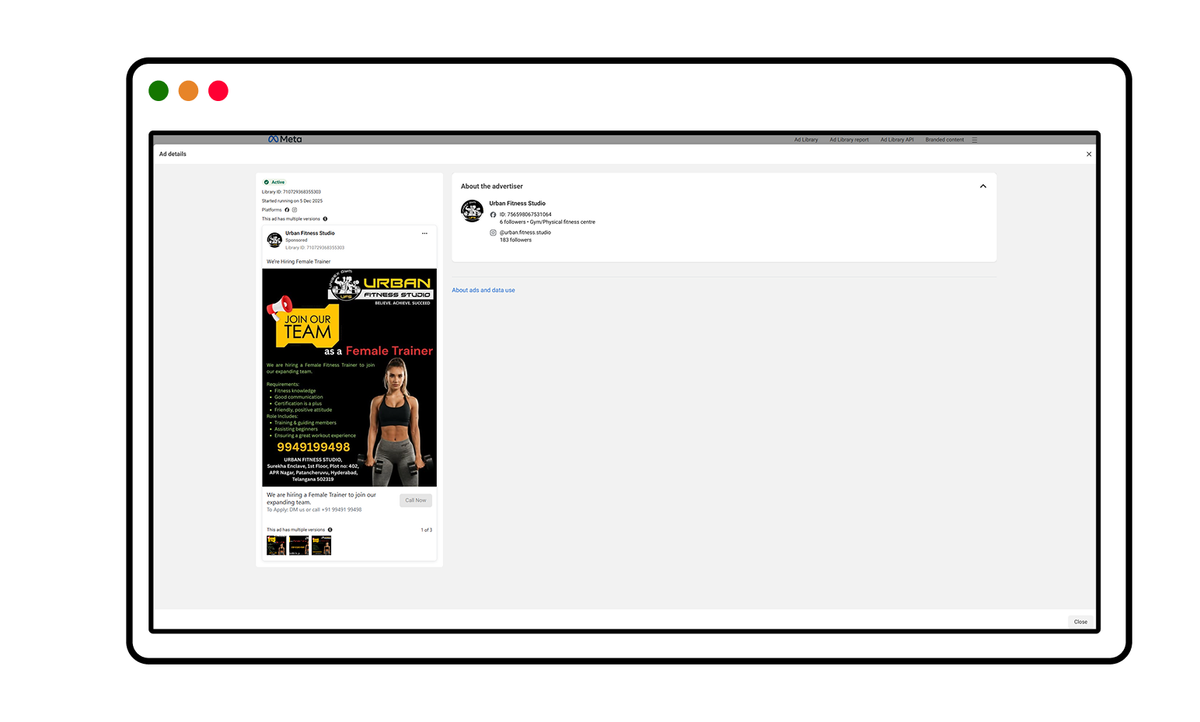
Ad Details | Meta Ad Library
Ad libraries have become essential tools in the modern marketer's arsenal. Here's why thousands of marketing professionals consult them daily:
Simply browsing ads randomly won't deliver insights. Here's a systematic approach:
Start with a clear question:
• "What creative styles are working in skincare advertising?"
• "How do competitors promote their app downloads?"
• "What offers are fashion brands running this month?"
Focused research questions lead to actionable insights.
Create a research list including:
• Direct competitors: Brands selling similar products to similar audiences
• Aspirational competitors: Larger brands you want to emulate
• Adjacent competitors: Brands in related categories targeting similar customers
• International leaders: Top global brands in your category
For example, if you run a premium tea brand, research both challenger competitors like Bigelow and category leaders like Twinings — the two will be running very different playbooks.
Approach your research methodically:
For each competitor, document:
• Total number of active ads
• Ad formats being used (video, carousel, single image)
• Primary messaging themes
• Offer types and promotional strategies
• Visual style patterns
• Call-to-action approaches
Use a spreadsheet to track patterns across multiple brands. This structured approach reveals trends that casual browsing misses.
Look for commonalities:
• Unanimous approaches: If all successful competitors do something, it's likely effective
• Unique differentiators: Note what makes one brand stand out from others
• Temporal patterns: How messaging shifts from weekday to weekend, or month to month
• Platform differences: How the same brand adapts creative for different platforms
Transform research into action:
For campaign planning: Use discovered patterns to inform your creative briefs. If competitors successfully use customer testimonials, incorporate them in your strategy.
For creative development: Share specific competitor ads with your design team as reference points. "Something like this, but adapted to our brand" is clearer than abstract descriptions.
For budget allocation: If competitors run more video ads than image ads, that format likely performs better. Weight your budget accordingly.
For testing hypotheses: Use competitor ads to develop test variations. If they're testing blue vs. orange backgrounds, you can run similar tests.
While ad libraries are powerful, many marketers misuse them:
The mistake: Directly copying competitor ads with minor brand swaps.
Why it fails: What works for one brand may not work for yours. Their audience, positioning, and brand equity differ from yours. Plus, blatant copying damages your credibility.
The better approach: Understand the principles behind successful ads. If a competitor's ad works, analyze why—is it the emotional appeal, the offer structure, or the visual hierarchy? Apply those principles in your unique way.
The mistake: Seeing a competitor run an ad once and assuming it's successful.
Why it fails: Brands test many ads, including ones that fail. An ad running for two days might have been killed for poor performance.
The better approach: Look for patterns over time. Ads that run for months with multiple variations are proven winners. Those are the ones worth studying closely.
The mistake: Only researching established brands with massive budgets.
Why it fails: Their strategies often require resources you don't have. A brand spending $60,000 a month on ads can afford approaches that will never work on a $600 budget.
The better approach: Research brands at similar scale to yours. Their constraints match yours, making their strategies more applicable. Also study scrappy challengers disrupting your category.
The mistake: Using ad libraries as a replacement for testing your own campaigns.
Why it fails: Your audience is unique. What works for competitors may not resonate with your specific customers.
The better approach: Use ad library research to inform your testing, not replace it. Develop hypotheses from competitor analysis, then validate them with your audience through structured A/B tests.
The mistake: Only looking at the main creative and missing subtle elements.
Why it fails: Success often hides in details—specific word choices, button colors, or offer framings that make the difference.
The better approach: Analyze ads systematically. Note everything — emoji usage, punctuation choices, whether prices include symbols ($99 vs. 99), and how offers are structured (20% off vs. $20 off).
Ad libraries continue evolving as regulations tighten and technology advances:
Governments worldwide are pushing for more advertising transparency. Expect:
• Expanded disclosure requirements: More platforms may be required to offer public ad libraries
• Deeper spending visibility: Commercial ads might receive similar spending transparency as political ads currently do
• AI ad labeling: Requirements to disclose when AI generates ad content or targets users
Third-party platforms are integrating artificial intelligence to provide deeper insights:
• Automatic categorization: AI systems that classify ads by customer journey stage, emotional tone, and strategic intent
• Performance prediction: Machine learning models that estimate which ads likely perform best based on historical patterns
• Trend detection: Algorithms that spot emerging creative trends before they become obvious
• Personalized recommendations: Systems that suggest relevant competitor ads based on your industry and goals
As marketers run campaigns across multiple channels, demand grows for unified ad intelligence:
• Single-dashboard monitoring: Track competitor ads across Facebook, TikTok, YouTube, and LinkedIn from one interface
• Omnichannel insights: Understand how brands coordinate messaging across platforms
• Comprehensive competitive profiles: See a complete picture of competitor advertising strategies, not just platform-by-platform fragments
The future will balance transparency with privacy protection:
• Aggregated data: More platforms may show trend data without revealing individual user targeting
• Consent-based tracking: Evolving privacy regulations will shape what information can be displayed
• Anonymized insights: Technologies that provide competitive intelligence while protecting personal data
Ad libraries have transformed from regulatory requirements into essential marketing tools:
• What they are: Public, searchable databases of digital advertisements that provide transparency into brand advertising strategies across platforms
• Why they exist: Created for political transparency but now serve as powerful competitive intelligence tools for marketers
• How to use them: Conduct systematic research with clear objectives, analyze patterns across multiple competitors, and apply insights to inform (not replace) your own creative testing
• Best practices: Focus on learning principles rather than copying, look for long-running campaigns that indicate success, research brands at similar scale to yours, and combine insights with your own A/B testing
• Future direction: Expect more transparency requirements, AI-powered analysis tools, and cross-platform consolidation as ad libraries evolve
Whether you're a solo entrepreneur or managing campaigns for major brands, ad libraries give you visibility that was impossible just a few years ago. The playing field has leveled—small brands can now access the same competitive intelligence as agencies with massive research budgets.
Ready to discover what your competitors are really doing? Begin with the free Facebook Ad Library—it's the most comprehensive starting point for social media advertising research.
Vibemyad Marketing Agency can handle competitor-ad research, creative strategy and production for your brand. Agree on the research questions and creative deliverables before starting.
Public ads give you references and hypotheses. Use your own campaign results to decide which ideas work for your business.
If you would rather not run this research yourself, our ecommerce marketing agency does competitor analysis, creative and paid media for DTC brands on Shopify. And if Meta is where your budget goes, start with our complete guide to the Meta Ad Library.
Get notified when new insights, case studies, and trends go live — no clutter, just creativity.
Table of Contents


Ananya Namdev
Content Writer, Vibemyad

Ananya Namdev
Content Writer, Vibemyad

Ananya Namdev
Content Writer, Vibemyad